
– Samsung Frame TV
Not necessarily Home Automation, but very much integrated into home/cloud networking and also with some Alexa capabilities. The Frame TV is only one (1) inch thick and lays flat against the wall to give the impression of it being a picture rather than a TV. You can use the standard bezels the device ships with, order alternatives [Example: decotvframes.com], or as in our case, you can DIY your own. Homedepot molding and paint – $50.
It’s actually a modern 4K TV with the usual media feeds and streaming options you’d expect (Netflix, Prime, Apple, Apps, etc.). But, when you press the off button it switches over into ‘Art mode’ and displays pictures from either the Samsung Art service or pictures you have uploaded yourself.
The Frame integrates with Amazon Alexa for a few control capabilities such as turning on/off/mode. Note that Google Home support is being discontinued in Mar/24.
Pic below is our finished install – for now. Too high for general TV usage if sitting but perfect for art and room decor. The height is fine when in the adjacent open kitchen/dining area while cooking or eating, or from an inclined position when couch surfing. We have TVs elsewhere for any serious viewing, but this works great for something like Jeopardy when you’re busy on the main floor and cannot disappear into the dungeon.
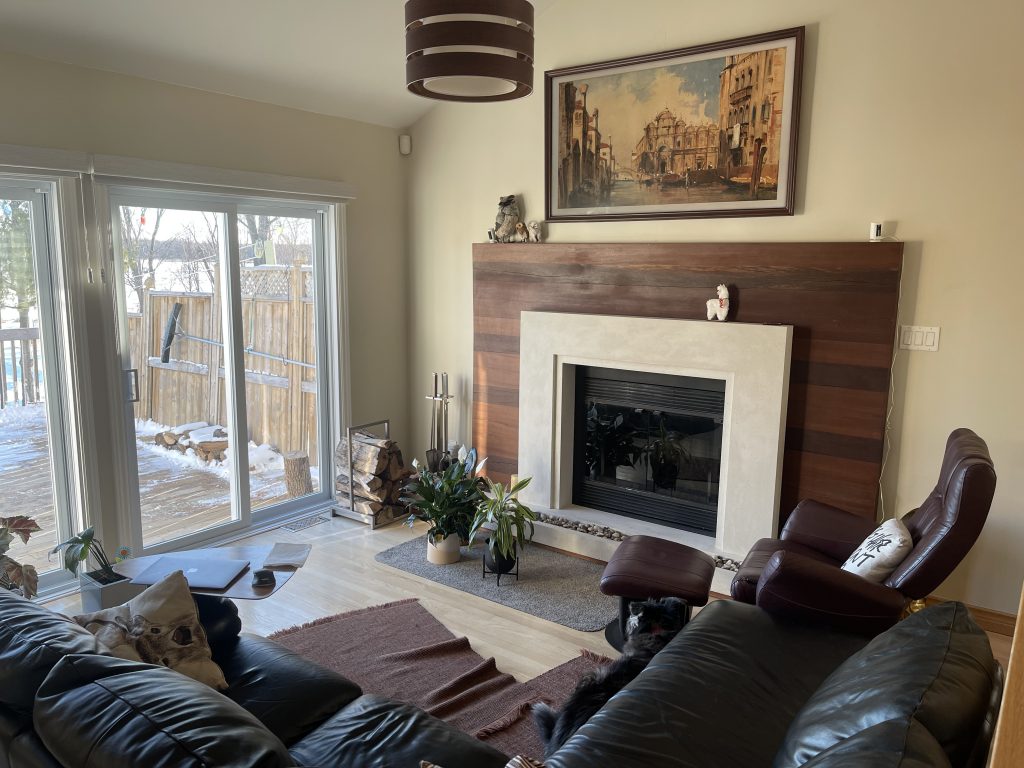
As for art content, Samsung offers a paid $8/month art service, or you can find your own images. We’re using both for now but the [reddit.com/r/theframe] subreddit has links to sources of art you can download and then upload to the device via USB (or app). We grabbed over 400 famous pieces the other day. Further to this, a Firestick inserted into an HDMI port using an app such as Gfolio or Skyfolio [snapwoodapps.com] allows you to view your own pics from Cloud storage. The Gfolio/Skyfolio is a one-time $14 and a Firestick costs $50. The Firestick option makes it easy to display non art content such as family pics / movies, create favorite lists, or seasonal content. No reason though it cannot be used for art though. As an example of digital art, the daily Bing pictures are amazing and can be downloaded [bing.gifposter.com]. With two distinct sources of content available, if we click the off button, the Frame jumps to an internally stored exclusive art only set of images, while the Firestick is used for personal and fun content.
As for anything negative, there is one consideration. To achieve the one inch thickness of the TV, there is a separate non-optional box (Oneconnect) from which you run a single thin cable to the TV. You cannot plug the TV directly into a wall outlet to bypass the box or use wifi only. The Oneconnect provides everything – power, video, HDMI, USB, and networking.
The Oneconnect box isn’t small (15″ X 6″ X 3″). Some folks hide the box by embedding it behind the TV in the wall, some hide the box in cabinets, or as in our case, hide the box at ground level – for now. In Samsung’s favour though the to-TV cable is amazingly thin and can easily be hidden or run through a wall. It should be noted that there are disclaimers saying the cable is not in-wall certified. Think this is because it carries power. Some ignore and some use conduit.